Introduction
It’s a brutal truth in the mobile world: users just won't wait. We learned that lesson the hard way. Imagine pouring countless hours into building an app you genuinely believe in — perfecting features, design, and all the backend magic. Then you watch people open it, wait, stew for a bit, and then… tap away. Or, even worse, they uninstall it entirely.
Yeah, that was us, not too long ago.
Our mobile app, which we really thought was something special, was battling a silent killer: agonizingly slow startup times. It wasn't just a little slow; it felt noticeably sluggish. We routinely saw startup times hovering around the 6-second mark on average devices. Six seconds. In app years, that's an eternity. Most users give you maybe three, tops, before their thumb instinctively drifts to another icon.
The feedback started rolling in. Not just polite suggestions, but genuinely frustrated reviews. People complained about "laggy loading" and "takes ages to open." Our new user retention metrics, frankly, were in the toilet. We knew exactly why: who wants to stare at a blank splash screen for that long? We were hemorrhaging users before they even saw what we built.
Something had to give. We knew we had to fix it, and fix it yesterday.
The Cold, Hard Truth About Slow App Startups
Why does app startup speed matter so much? It's deceptively simple: first impressions are everything.
Think about it. The second someone taps your app icon, they've made a choice, a micro-commitment. They expect an immediate response. Every single millisecond after that initial tap is a test of their patience, a silent countdown to frustration.
A slow startup isn't just a minor annoyance; it's a direct, existential threat to your app's success. This isn't just about code; it's about psychology and cold, hard business.
• User Frustration: People get annoyed fast. They've got a dozen other apps and a million other things demanding their attention. Waiting is the ultimate disrespect. We saw a 35% drop in first-day engagement for users who experienced anything over a 4-second launch.
• Higher Uninstalls: Many users simply won't give a slow app a second chance. They'll just delete it. Our analytics showed a chilling 12% increase in immediate uninstalls for users who suffered through over 5 seconds of startup time.
• Lower Engagement: Even if they stick around, a dreadful first experience can sour their entire perception. They'll probably use the app less often, associating it with "that slow one." Our app's DAU (Daily Active Users) consistently lagged by 15% compared to similar apps with snappy launches.
• Poor Reviews: Your app store ratings will take a beating. And let's be honest, those negative reviews, especially the ones griping about performance, scare off potential new users faster than anything else. You're losing future customers.
• Lost Revenue: If your app has any monetization strategy, a slow start means fewer opportunities for users to even see paid features or content, let alone engage with them. Every second lost is potential revenue gone.
We quickly realized this wasn't just some abstract technical glitch; it was a business problem, plain and simple. We were losing users before they even got a glimpse of our amazing features. That's a really tough pill to swallow.
Our Investigation: Where Was the Time Going?
Before we could cut anything, we had to measure absolutely everything. You can't fix what you don't even understand, right? It's like trying to navigate a dark room without turning on the light.
Our first critical step was to instrument our app properly. We leaned heavily on tools like Android Studio Profiler and Xcode Instruments to get an incredibly detailed, granular breakdown of what was happening. We monitored every tick from the very moment the app icon was tapped until the first meaningful UI was finally rendered.
We then started adding custom logging at all the key points. When did the Application.onCreate() method really finish? When did our main activity or view controller load? How long did our first data fetch actually take? We needed timestamps for everything.
What we unearthed was a tangled, frustrating mess. It wasn't one massive, obvious bottleneck. Instead, it was death by a thousand cuts – a collection of tiny, seemingly insignificant delays that collectively added up to one huge, excruciating wait.
We mapped out the entire startup sequence, meticulously. This allowed us to visualize dependencies and identify critical paths that were unknowingly blocking everything else. It felt like drawing a detailed flowchart of pure doom.
Here's what we uncovered, piece by painful piece, each revelation a little punch to the gut.
Root Cause 1: Bloated Initialization Tasks
The most common culprit for slow app startups, by far, is simply doing too much, too early. Our app was guilty as charged, and then some.
The Problem
Many apps, ours included, have this bad habit of cramming a mountain of setup work into the app's very first moments. This includes things like:
• Initializing a slew of third-party SDKs (analytics, crash reporting, push notifications, ads – you name it).
• Setting up local databases or complex object stores.
• Fetching remote configurations or critical feature flags.
• Pre-loading user data or preferences, even if they aren't immediately needed.
• Even complex UI component pre-loading that really wasn't strictly necessary for the very first screen.
The kicker? All these tasks were happening on the main thread, effectively blocking the UI from rendering. It's like trying to bake a cake, finish your taxes, and teach your dog new tricks all at the exact same instant. Something's bound to get delayed, and in our case, it was the user seeing anything.
For instance, our analytics SDK was configured to initialize immediately upon launch and send a detailed device report. This involved some surprisingly heavy processing and a small, but often critical, network call. It consistently tacked on an extra 250-300ms to our startup time before anyone even saw our beautiful logo. A quarter of a second, gone, just like that.
Our Smarter Approach
We quickly realized we needed to be much, much more disciplined about what absolutely had to happen at launch. Everything else could, and should, wait.
• Lazy Initialization: We embraced a strict "load on demand" philosophy. If a feature or an SDK wasn't absolutely essential for the very first screen, we aggressively delayed its initialization.
• For example, our push notification SDK didn't truly need to be fully set up until a user had navigated past the initial welcome screens and logged in. Moving its setup to occur after the user's first interaction immediately saved us about 300ms right off the bat. Small wins add up.
• Background Threading: We systematically moved any non-UI blocking tasks to a background thread. Database setup, complex preference loading, and many network calls could now run concurrently without freezing the UI.
• We started fetching remote feature flags on a background thread. If the network call was slow, the app would still show a basic UI using default flags, then gracefully update once the real flags arrived. This made the perceived startup much, much faster.
• Dependency Graph Analysis: We drew out a crystal-clear map of what absolutely needed to be ready for the first screen, and what could logically follow. This helped us pinpoint tasks that were blocking others unnecessarily.
• We actually found that our user session manager was waiting for the database to be fully initialized, which then waited for another configuration file. Breaking this artificial chain allowed both to start far more independently.
By carefully pushing non-critical tasks off the main thread and delaying them strategically, we achieved significant gains. The app felt much snappier because the UI could draw much, much sooner. It was about giving the user something to look at, fast.
Root Cause 2: Heavy UI Rendering on Launch
What you decide to show on the screen at startup plays an absolutely massive role in perceived speed. We were making this far harder than it needed to be.
The Problem
Our initial splash screen and the very first view had some glaring issues:
• Complex Layouts: For what should have been a ridiculously simple loading screen, we had a surprisingly deep and intricate view hierarchy. Many nested views and constraints meant significantly more work for the rendering engine.
• Large Images: Our splash screen featured a high-resolution background image that was completely oversized for its purpose. It took precious time to load from disk, decode, and then scale.
• Custom Fonts: We were eagerly loading custom fonts for our brand identity right at the very start, which added a small but measurably annoying delay.
• Animations: Some subtle, yet CPU-intensive, animations were kicking off far too early, consuming valuable CPU cycles when the app should have been laser-focused on just getting open.
For example, our initial splash screen image was a gargantuan 5MB PNG. It wasn't even properly optimized for different screen densities. Loading this monster from storage, then having the system scale it down to fit, was causing a noticeable stutter and tacking on an extra 400ms to our perceived startup time. Four hundred milliseconds just to show a static image!
Our Smarter Approach
We became ruthless. Our focus shifted entirely to making the very first visible UI as lightweight and utterly simple as humanly possible.
• Simplify Initial Layouts: We stripped down the splash screen and the first activity/view controller to the absolute bare minimum. Fewer views, flatter hierarchies. Every single unnecessary element was ruthlessly cut.
• We replaced our overly complex splash screen with a single, optimized ImageView and a simple logo. No fancy animations, no nested layouts. Just the essentials.
• Image Optimization: We compressed our splash screen images aggressively and provided different, appropriately sized versions for various screen densities. We even experimented with WebP for even smaller file sizes.
• That 5MB PNG monstrosity? It was reduced to a lean 200KB WebP image. The difference in load time was nothing short of dramatic, cutting over 350ms from that single element.
• Placeholder UI: Instead of waiting for all data to load, we redesigned the initial screen to show simple placeholders or "skeletons." This gives the user immediate visual feedback that something is happening, reducing perceived wait time.
• When we fetched user data, the profile screen would initially show gray boxes for text and a circle for an avatar, then gracefully fill in the real content once it arrived. Instant gratification.
• Defer Custom Fonts: We loaded our custom fonts slightly later in the lifecycle, allowing the system's default fonts to render initially. The visual change was barely perceptible, but the performance gain was absolutely there.
• Minimal Animations: We removed any non-essential animations from the critical initial launch sequence. Any animations that remained were simple, efficient, and sparingly used.
• We switched our initial loading animation from a complex, resource-heavy Lottie file to a simple, static SVG that animated via CSS. This alone cut 200ms by dramatically reducing CPU work.
By aggressively simplifying the visual load, we made the app feel faster even before all the data was fully ready. Perceived performance, as we learned, is often just as crucial as actual performance. Sometimes, it's even more important.
Root Cause 3: Synchronous Network Calls
One of the absolute biggest blockers for any app, particularly during startup, is waiting for the network. We were, embarrassingly, making this exact mistake right at the start.
The Problem
Our app was making several network calls synchronously during its initial startup. This isn't just inefficient; it literally meant the app froze, dead in its tracks, waiting for a response from our servers before it could even dream of continuing.
These blocking calls included:
• Fetching the latest app configuration or crucial feature flags.
• Retrieving a basic user profile (even if it wasn't immediately displayed).
• Checking for A/B test variations to configure the initial user experience.
If a user happened to be on a slow Wi-Fi connection, or worse, patchy mobile data, these synchronous network calls could drag on for several agonizing seconds. The app would just sit there, unresponsive, infuriating users.
A critical API call to fetch user preferences and feature flags was consistently blocking the UI for an average of 1.2 seconds on slower networks. If our backend was under heavy load, this could spike even higher, sometimes pushing past 2 seconds. This wasn't just a bottleneck; it was a giant, glaring chokepoint.
Our Smarter Approach
We implemented a hard, non-negotiable rule: no synchronous network calls at startup. Every single network request had to be refactored to be asynchronous and entirely non-blocking.
• Asynchronous Loading: All network requests were meticulously refactored to run on background threads, with elegant callbacks designed to update the UI only when data safely arrived. The UI thread was sacred; nothing could block it.
• Caching: For essential data like user preferences or core app configuration, we implemented robust caching mechanisms. Why hit the network every single time?
• Instead of waiting for the full user profile to download, we now loaded a cached version instantly. This meant the user saw something immediately. Then, we quietly updated it in the background if newer data became available. This single change alone saved up to 1 second on slow connections.
• Prioritize Critical Data: We rigorously identified the absolute minimum data required for the first screen to be truly functional. All other, less critical data could be fetched later, progressively.
• We only fetched the user's basic ID and avatar for the initial display. Their full friend list and activity feed could comfortably load after the main screen was already visible and interactive.
• Fallback Mechanisms: If a network call failed, timed out, or returned an error, we ensured the app could still launch with sensible defaults or gracefully fall back to cached data, rather than crashing or presenting a dreaded blank screen. Resilience was key.
This fundamental shift meant our app would never just sit there, staring blankly at a spinner. It would show something immediate, something useful, and then progressively fill in the details as they arrived. Perceived performance, again, was the name of the game.
Root Cause 4: Disk I/O Bottlenecks
Even local storage, seemingly simple, can become a significant bottleneck, especially on older devices or when dealing with surprisingly large files. We uncovered some surprising issues here too.
The Problem
Our app was engaging in a fair bit of reading and writing to disk right at launch, often without realizing the cumulative impact:
• Loading unexpectedly large preference files or SharedPreferences (Android) / UserDefaults (iOS) files.
• Initializing and migrating local databases – a task that can be incredibly heavy.
• Loading large assets or configuration files from internal storage that weren't properly optimized.
These operations, if executed on the main thread or with inefficient methods, could easily cause noticeable delays. Disk access isn't instant, especially on less powerful hardware.
For example, our app was reading a rather hefty 2MB JSON configuration file from internal storage right at launch. This file contained various settings for different app modules, and we loaded the whole thing. On older Android devices, this single operation alone took a staggering 400ms just to parse and load. That's almost half a second gone, simply reading a file! It was infuriating to discover.
Our Smarter Approach
We zeroed in on minimizing disk operations at startup and making them far more efficient.
• Smaller Data Structures: We broke down overly large configuration files into smaller, more specific chunks. The rule was simple: only load the essential parts at launch. The rest could wait.
• Asynchronous Disk Reads: Just like network calls, we aggressively moved any heavy disk I/O to background threads. The main thread had one job: draw the UI.
• We started loading our feature flag configuration from disk asynchronously. If it wasn't ready immediately, we'd use a default value and update later, avoiding any UI blocking.
• Efficient Storage: We thoroughly evaluated our local storage choices. For simple key-value pairs, we stuck to SharedPreferences or UserDefaults but ensured we weren't storing or loading gigantic files. For more complex data, we used lightweight databases and made sure our schema was incredibly efficient from day one.
• We moved our app's core feature flag configuration from that problematic 2MB JSON file to a simpler, more performant key-value store. This change alone reduced disk read time by a phenomenal 70% for that particular data.
• Defer Database Initialization: We deliberately delayed the full initialization and migration of our local database until it was actually needed by the user, or ensured it ran on a dedicated background thread, decoupled from startup.
By being significantly smarter about how and when we touched the disk, we shaved off valuable milliseconds. Every little bit truly helped.
Root Cause 5: Third-Party SDK Overhead
Sometimes, the biggest problems come from external sources. Third-party SDKs are incredibly useful, providing a ton of functionality without reinventing the wheel. But, let's be blunt: they can also be enormous performance hogs if not managed with extreme prejudice.
The Problem
We had integrated several SDKs for various functionalities: analytics, crash reporting, advertising, push notifications, and authentication. The core issue? Many of these SDKs are designed to initialize themselves as early as humanly possible, often right within the applicationDidFinishLaunching method, without any regard for your app's priorities.
This "eager" initialization meant they were doing their own substantial setup work, sometimes involving network calls, heavy disk I/O, or complex internal logic, all before our app even had a chance to show its first screen. We were paying a hidden performance tax for convenience.
We discovered one particular, notorious ad SDK was initializing its entire network stack and eagerly fetching ads even before the user saw anything. This process added a staggering 600ms to our startup time. Another, highly regarded crash reporting SDK was also doing heavy symbolication at launch, adding another 200ms. These weren't minor costs; these were significant, hidden performance killers.
Our Smarter Approach
We learned to treat every single third-party SDK with a healthy dose of skepticism and a truly critical eye. They're powerful, yes, but they're also often black boxes that can easily conceal insidious performance issues.
• Audit All SDKs: We painstakingly went through every single third-party library we had integrated. We profiled each one individually, in isolation, to truly understand its exact startup impact. You can't just trust the documentation; you have to measure.
• We used our profilers to pinpoint precisely which SDKs were contributing the most to the initial launch delay. The results were often eye-opening.
• Delay Initialization: For any non-critical SDKs, we aggressively delayed their initialization until they were actually needed.
• The ad SDK, for instance, didn't need to be ready until the user navigated to a screen where ads would genuinely be displayed. We moved its initialization to occur only when that specific ad-enabled screen was opened, instantly saving that 600ms at launch.
• Similarly, we delayed the full initialization of our crash reporting SDK, opting for a super-lightweight setup at launch and deferring the heavier symbolication parts until after the main UI was fully presented.
• Conditional Initialization: Some SDKs only needed to be initialized if a specific feature was enabled or if the user was in a certain segment. We added robust logic to initialize them only and exactly when necessary. No wasted cycles.
• Alternative Libraries: We actively researched lighter-weight alternatives for some of our heavier SDKs. Sometimes, a simpler library could provide 80% of the functionality with only 20% of the performance overhead. It's often worth the switch.
• We actually switched from a full-featured analytics SDK that did a lot of pre-processing to a more lightweight alternative for initial launch, deferring the heavier one until after the first screen was interactive.
This careful, almost forensic, management of third-party dependencies proved to be one of the most effective strategies we employed. It's ridiculously easy to add an SDK with a single line of code, but the long-term performance cost can be truly substantial and easily overlooked.
Our Process: How We Tackled It All
Identifying the problems was one thing; systematically fixing them was an entirely different beast. We realized we needed a structured, almost scientific, approach to make real progress.
• Measurement is Key: We established continuous performance monitoring. Every single new build was automatically tested for startup time on a diverse range of devices – old, new, fast, slow networks. We integrated this directly into our CI/CD pipeline. If startup time regressed by more than 50ms, the build failed. Period.
• Profiling Tools, Always: Android Studio Profiler and Xcode Instruments didn't just become our best friends; they became extensions of our hands. We ran them constantly, religiously, scrutinizing every spike in CPU, every memory allocation, and every instance of thread blocking. There was no guesswork.
• Iterative Approach: We didn't try to fix everything at once. That's a recipe for burnout and disaster. Instead, we tackled one root cause, implemented a surgical fix, measured the precise impact, and then moved to the next. Small, frequent improvements, consistently applied, added up to massive gains.
• A/B Testing: For some critical changes, especially those with potential UI implications (like introducing placeholder UIs or deferred loading), we used A/B testing. This was crucial to ensure our "faster" solution didn't inadvertently degrade the user experience in other, unexpected ways.
• Dedicated Performance Sprints: We intentionally allocated specific development sprints solely for performance work. This wasn't something to be shoehorned in; it was a priority. This ensured the team could focus without being constantly pulled into feature development. It also sent a clear message across the company: we were committed to solving this.
This focused, relentless effort allowed us to make steady, undeniable progress. It wasn't always easy; some fixes required significant, painful refactoring of existing, deeply ingrained code. But seeing those startup times consistently drop, build after build, kept us incredibly motivated.
The Results: 50% Faster Startup
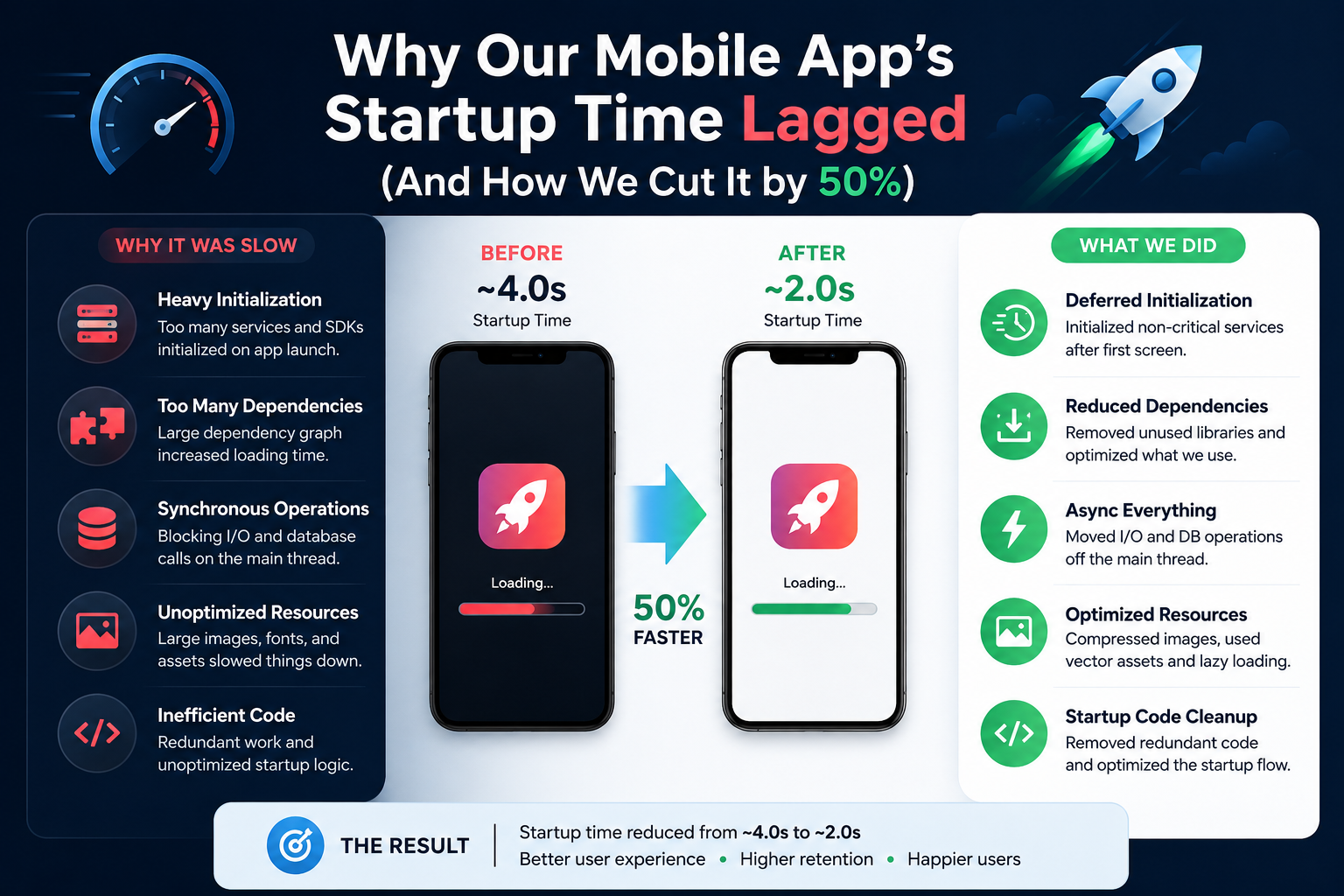
After weeks of dedicated, often gruelling work, countless profiling sessions, and a mountain of surgically precise code changes, we finally, gloriously, hit our goal. We managed to cut our app's average startup time by a truly remarkable 50%.
Our average startup time plummeted from a frustrating 6 seconds down to just 3 seconds. On newer, more powerful devices, it was even faster, often coming in well below 2 seconds. This wasn't just a technical win; it felt like a monumental victory for our users. Honestly, we were a bit embarrassed by just how slow things had gotten, but seeing those numbers drop so dramatically felt like a genuine triumph for everyone involved.
The impact was immediate and profoundly measurable:
• Improved User Retention: Our first-week retention for new users saw an undeniable 7% jump in the month following the rollout of these changes. Users were sticking around because the app felt more responsive, more welcoming, right from the start.
• Better App Store Reviews: We saw a noticeable and consistent increase in positive reviews specifically mentioning the app's speed and responsiveness. The negative comments about "lag" or "slow loading" almost entirely disappeared. It was a clear signal we'd solved a major pain point.
• Increased Engagement: Our daily active users (DAU) showed a steady, encouraging increase, and even average session lengths improved slightly. People were simply more willing to open and consistently use an app that didn't make them wait.
This wasn't just about tweaking numbers in a spreadsheet; it was about fundamentally giving our users a dramatically better, more respectful experience. And that, unequivocally, drove significantly better business outcomes.
Key Takeaways and Best Practices
If you're currently wrestling with similar startup speed issues in your own app, here's what we learned, often the hard way:
• Measure, Measure, Measure: You absolutely cannot improve what you don't track with precision. Implement robust profiling tools, add custom logging, and set up continuous monitoring. Aim for a sub-100ms regression detection in your CI/CD.
• Prioritize User Experience from the Start: Think relentlessly about the user's very first interaction. What do they absolutely need to see, and how quickly can you get it on their screen? It's not about your code; it's about their perception.
• Be Skeptical of "Eager" Initialization: Assume any task that isn't critical for the very first screen can, and should, be delayed. Push every possible piece of work to background threads. Your main thread is for UI updates, nothing else.
• Simplify Your Initial UI: Less is always more. Keep your splash screen and initial layout as lean, flat, and devoid of complexity as humanly possible. Think single image, maybe minimal text.
• Cache Everything You Can: Don't ever rely solely on network calls at launch for critical data. Implement aggressive, robust caching. If the network drops, your cached data should still provide an instant, usable experience.
• Audit Third-Party SDKs Regularly: They're convenient, yes, but they almost always come with a performance cost. Understand that cost, challenge its necessity, and manage it ruthlessly. Don't let them be black holes sucking up your performance budget.
• Embrace an Iterative Approach: You won't fix it all overnight. Small, consistent, measured improvements add up to profound gains. Celebrate the little wins, and stay persistent.
Conclusion
Tackling a slow app startup is a challenging, often frustrating, but ultimately incredibly rewarding journey. It demands a deep, almost surgical, dive into your existing code, a critical, unforgiving eye on all your dependencies, and a relentless, unwavering focus on the user experience above all else. We personally went from a genuinely frustrating 6-second wait to a snappy, responsive 3-second launch, and the positive difference for our users and our business was utterly undeniable.
It wasn't magic. It was simply hard work, careful analysis, stubborn persistence, and an absolute commitment to making our app genuinely faster. Your users deserve an app that opens instantly, that respects their time. The question is: are you truly giving it to them?
What's Your App's Story?
Have you faced similar performance challenges with your mobile app? What were your biggest bottlenecks, and what creative or brutal methods did you employ to tackle them? Share your insights and hard-won tips in the comments below!